
12 Soft Cottagecore Minecraft PFPs You Need to Try!
Finding the perfect profile picture Minecraft PFPs for your social media can feel surprisingly difficult. Cottagecore aesthetics offer a soft, cozy, and gentle vibe for online profiles. They bring peaceful nature, cute outfits, and warm lighting to your digital identity. However, creating a truly aesthetic Minecraft PFP requires careful planning and styling. You need balanced colors, cute skins, and picturesque backgrounds that blend seamlessly together. In this comprehensive guide, you will discover stunning cottagecore Minecraft profile ideas. These concepts work amazingly for Discord, Pinterest, YouTube, and Instagram accounts today.

Understanding lighting and composition will completely transform your Minecraft profile pictures. Minecraft skins offer an incredible range of custom outfits, hairstyles, and accessories. You can wear cozy overalls, floral crowns, and oversized knitted sweaters for sweetness. Furthermore, blending custom character skins with soft shader lighting creates absolute magic. Positioning your character in lush meadows or cozy gardens adds natural depth. You can capture close-up face shots or atmospheric landscape character poses. Therefore, experimenting with aesthetic cottagecore PFPs expands your online creative presence.
Minecraft features countless natural biomes that serve as perfect photo backdrops today. Cherry blossom groves offer delicate pink backgrounds filled with soft falling petals. Sunflower plains bring cheerful yellow energy and bright sunshine to your profile. Furthermore, dark oak forests and mushroom fields provide cozy, rustic fantasy vibes. Lush caves with glow berries offer magical, twinkling light for moody shots. Combining these beautiful biomes with aesthetic shaders creates endless artistic profile options.
Many players struggle with taking good screenshots without making photos look cluttered. Too many background elements can easily distract from your main avatar character. Consequently, setting up soft depth of field effects is crucial for success. Pairing pastel skins with warm sunset lighting softens hard pixelated edges. Custom head items, flower crowns, and held items bring extra charm. Meanwhile, gentle camera angles make your avatar look sweet and natural. Using the right camera angles makes your cottagecore profile pictures pop.
Before taking your aesthetic screenshots, plan your avatar outfit and environment carefully. First, pick a high-quality cottagecore skin with soft, pastel color palettes. Next, choose a peaceful location with great natural lighting and foliage. After that, install a aesthetic shader pack to enhance lighting and shadows. Furthermore, consider holding cute items like wild flowers, lanterns, or books. Soft golden hour lighting along character edges enhances the cozy aesthetic. As a result, your final profile picture looks polished, professional, and aesthetic.
Creating cottagecore Minecraft PFPs allows for endless artistic self-expression online today. Whether you prefer sweet floral themes or moody woodland styles, cottagecore fits. You can match profile pictures with friends or design seasonal social avatars. Moreover, soft Minecraft profile aesthetic content performs exceptionally well on Pinterest boards. Sharing your aesthetic profile pictures will surely inspire other creative community members. Therefore, learning these detailed profile picture concepts is great for your channel.
In this guide, we will explore twelve distinct cottagecore Minecraft PFP concepts. Each idea includes a full word introduction, detailed outfit setup, and guide. You will learn how to mix custom skins, shaders, and props effectively. Additionally, these concepts suit both Bedrock and Java edition community players. So, customize your skin, pick your biome, and start snapping photos. Let us dive directly into these soft, cozy Minecraft profile picture ideas.
1. Floral Crown Cherry Blossom Girl PFP

The cherry blossom floral crown avatar is a timeless cottagecore profile choice. It features a soft character wearing a delicate crown of wild pink flowers. Furthermore, this design uses soft cherry blossom groves for a dreamy background. It brings a sweet, romantic, and peaceful energy to your social profiles.
To capture this profile picture, position your character beneath pink blooming branches. The falling petal particles create a natural, dynamic filter across your shot. Furthermore, angling the camera slightly upward emphasizes the cute floral head crown. Adding soft shader warmth makes the pink tones look creamy and smooth.
Soft Shader Lighting
Lighting plays a massive role in creating dreamy pastel profile picture screenshots. Using shaders with soft bloom effects turns sunlight into a gentle glow. Furthermore, enabling ambient occlusion softens dark shadows around facial pixel details. Sunlight filtering through pink leaves enhances the delicate, cute character aesthetic.
Materials and Setup
- Pastel Linen Dress Skin
- Custom Flower Crown Skin
- Cherry Blossom Biome
- Warm Shader Pack
- Rose or Peony Item
Step-by-Step Guide
First, equip a cute Minecraft skin with soft pastel hair and dress. Ensure your character skin includes a detailed flower crown or leaf accessory. Next, travel to a dense cherry blossom grove during bright mid-morning hours. Consequently, you secure a vibrant, pink natural backdrop for your screenshot.
Second, hold a bright red rose or pink peony in your hand. Position your character close to low-hanging petal leaves for natural framing. Adjust your camera angle using second-person view facing your avatar face. Consequently, your character fills the center frame while maintaining soft background blur.
Third, adjust your FOV camera settings down to thirty for zoom depth. Turn on your shaders to activate soft sunbeams and dynamic leaves. Additionally, capture multiple screenshot frames while pink leaf particles float past your face. Finally, crop the screenshot into a perfect square for profile uploading.
2. Cozy Overalls Mushroom Forest Boy PFP

The mushroom forest boy profile picture highlights rustic, adventurous cottagecore aesthetics. It features a character wearing earthy denim overalls and a knitted sweater. Furthermore, setting this shot inside a tall red mushroom biome adds fantasy. It brings a grounded, cozy, and playful vibe to your digital avatar.
Earthy green and brown color schemes feel deeply comforting on social feeds. Pairing denim blue with warm mushroom red creates strong visual color balance. Furthermore, posing near giant mushroom caps provides a bold, iconic framing shape. Consequently, your profile picture looks sweet, adventurous, and full of personality.
Earthy Color Balance
Blending rich brown and dark green tones creates an authentic rustic mood. Deep forest greens complement red mushroom caps without overwhelming character skin details. Furthermore, adding soft golden sunlight prevents dark woodland biomes from looking gloomy. Consequently, the final profile photo feels warm, cozy, and perfectly balanced.
Materials and Setup
- Denim Overalls Skin
- Brown Mushroom Cap Hat
- Old Growth Birch Forest
- Chocapic Shaders
- Red Mushroom Item
Step-by-Step Guide
First, select a rustic skin wearing cozy denim overalls and brown boots. Ensure the skin features fluffy hair and a cute mushroom cap hat. Next, locate a tall old growth birch or giant red mushroom biome. Consequently, you establish a lush, earthy environment for your character photo.
Second, place your avatar sitting on a mossy log or stone block. Hold a small red mushroom item in your main character hand. Position the camera at eye level, focusing closely on character facial features. Consequently, the background giant mushrooms blur gently behind your cozy avatar face.
Third, enable warm shader settings to cast long, golden late afternoon shadows. Lower your in-game field of view to create cinematic depth of field. Additionally, tilt your character head slightly using emote mods for natural expression. Finally, save your high-resolution screenshot and apply soft contrast edits online.
3. Golden Hour Sunflower Field Reader PFP

The sunflower field reader profile picture captures warm, sunny cottagecore magic effortlessly. It showcases an avatar holding an ancient leather book among bright yellow flowers. Furthermore, taking this screenshot during golden hour creates a breathtaking golden glow. It conveys intelligence, warmth, and peaceful outdoor relaxation for your profile.
Golden hour lighting softens hard pixel edges and casts rich yellow light. Surrounding your character with tall yellow sunflowers creates a vibrant natural frame. Furthermore, holding a open book adds an adorable, cozy storytelling element. As a result, your profile picture instantly catches attention on dark mode.
Sunbeam Flare Effects
Capturing direct golden hour sunlight creates romantic light flares across your avatar. Shaders with lens flare features convert simple sunsets into cinematic masterpieces. Furthermore, light hitting the sides of hair pixels creates a glowing rim. Consequently, your character stands out dramatically from the warm, golden background.
Materials and Setup
- Vintage Knitted Cardigan Skin
- Round Glasses Skin Detail
- Sunflower Plains Biome
- Complementary Shaders
- Written Book Item
Step-by-Step Guide
First, wear a vintage skin featuring a knitted cardigan and round glasses. Ensure the outfit uses warm creams, soft oranges, and earthy brown tones. Next, find a wide sunflower plains biome facing the setting golden sun. Consequently, you prepare a brilliant, sun-drenched backdrop for your warm portrait.
Second, hold a written book item directly in your avatar hand. Stand directly inside a dense cluster of tall yellow sunflower blocks. Angle your camera slightly downward to capture both sunflowers and character face. Consequently, bright yellow petals surround your avatar in a natural floral frame.
Third, wait for the in-game sun to reach the horizon line. Activate your shader pack to generate dramatic, warm sunbeams and shadows. Additionally, take the screenshot right as golden light bathes your character skin. Finally, crop the picture tightly around your head and upper chest.
4. Rainy Window Cottage Baker PFP
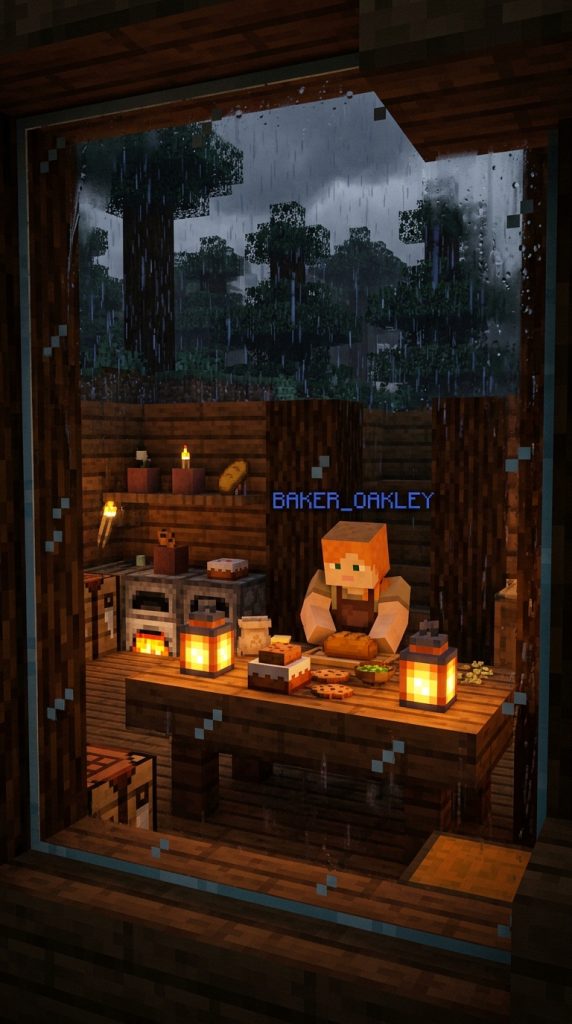
The rainy window baker profile picture highlights moody, ultra-cozy indoor aesthetic warmth. It features a baker character inside a wooden cabin while rain falls outside. Furthermore, looking through glass panes covered in raindrops creates incredible atmospheric mood. It brings a calm, comforting, and homey feel to your profile.
Rainy aesthetic profile pictures offer a peaceful contrast to bright sunny shots. Warm interior light from lanterns creates a cozy haven against grey rain. Furthermore, using custom rain shaders adds realistic water drops on glass windows. Consequently, your profile photo feels intimate, calm, and deeply comforting online.
Indoor Glass Reflections
Photographing characters through glass windows creates soft, artistic blurred layers naturally. Placing glowing candles inside near the window pane adds warm reflections. Furthermore, grey rainy weather outside turns background trees into soft, moody silhouettes. Consequently, the contrast between warm indoors and cool outdoors looks stunning.
Materials Needed
- Linen Apron Baker Skin
- Chef Hat or Messy Bun
- Cozy Wooden Cabin Interior
- BSL Shaders with Rain Trace
- Bread or Cookie Item
Step-by-Step Guide
First, dress your character in a sweet apron skin with messy hair. Build a small, cozy wooden cabin using warm dark oak blocks. Next, install large glass windows looking out onto a dark spruce forest. Consequently, you construct an intimate indoor photo studio for rainy shots.
Second, place glowing lanterns and cake items on a nearby wooden table. Position your character standing indoors, looking out through the clear glass. Hold a fresh baked cookie or bread item in your hand. Consequently, your character looks cozy, warm, and busy inside their kitchen.
Third, toggle rainy weather using in-game console commands for dynamic rain. Enable shader settings that add realistic rain droplets directly onto glass. Additionally, position your camera outside the cabin, looking in through glass. Finally, capture the shot as rain drops streak down the warm window.
5. Enchanted Lantern Lush Cave PFP
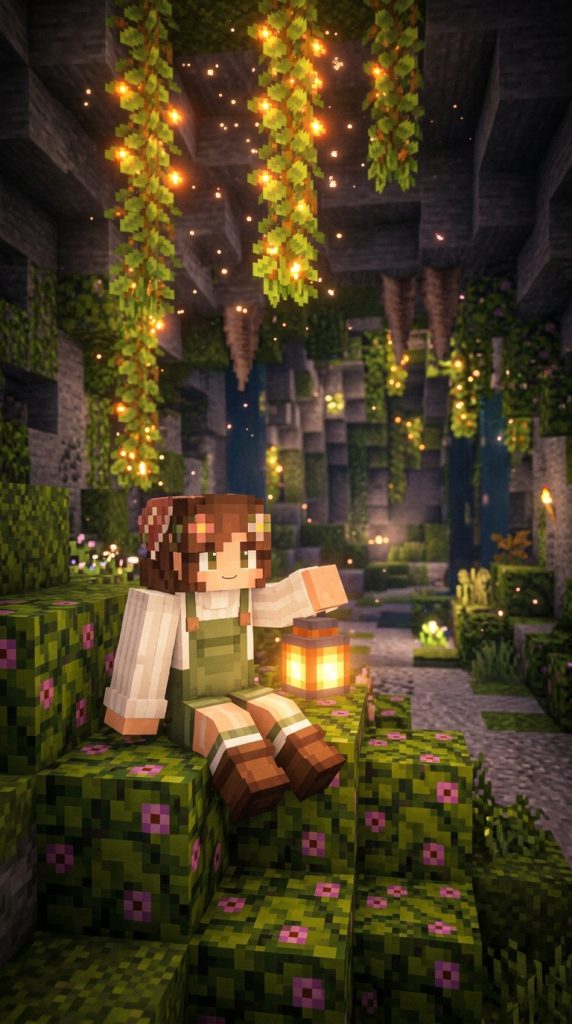
The lush cave lantern profile picture blends magical fantasy with cottagecore charm. It showcases a character holding a glowing lantern inside a mossy cavern. Furthermore, glowing berries hanging from ceiling vines create a starry night effect. It brings a mysterious, magical, and enchanting aesthetic to social channels.
Lush caves offer some of the most vibrant, cozy underground lighting naturally. Sprawling green moss carpets paired with glowing orange berries look totally magical. Furthermore, holding a bright lantern illuminates your character face in dark caves. Consequently, your profile picture gains an ethereal, fairy-tale quality that stands out.
Ambient Cave Illumination
Lighting dark underground caves requires balancing multiple warm, soft light sources. Glowing berry vines provide delicate, scattered points of warm orange light overhead. Meanwhile, a held lantern casts strong, direct directional light onto facial features. Consequently, the interplay between background glow and character lighting feels breathtakingly artistic.
Materials Needed
- Soft Moss Green Overalls Skin
- Flower Clip Hair Detail
- Underground Lush Cave Biome
- AstraLex Shaders
- Lantern or Soul Lantern Item
Step-by-Step Guide
First, equip a cute skin wearing moss green overalls and floral clips. Venture deep underground until you discover a wide, lush cave biome. Next, locate a cavern section filled with dense moss and glow berries. Consequently, you locate a magical, glowing underground paradise for taking screenshots.
Second, place your character sitting on a soft azalea leaf block. Hold a traditional iron lantern or cool blue soul lantern item. Angle your camera upward to capture glowing berries hanging from above. Consequently, your avatar is framed by sparkling, natural underground light sources.
Third, adjust your shader settings to amplify glowing light block brightness. Lower key lighting slightly so the lantern casts dramatic facial shadows. Additionally, capture the shot while spore blossom particles float through air. Finally, crop the image neatly to highlight facial expression and lantern glow.
6. Twilight Firefly Mossy Forest PFP

The twilight mossy forest profile picture captures quiet, peaceful evening woodland atmosphere. It features an avatar standing in a dark forest surrounded by fireflies. Furthermore, the deep blue twilight sky provides rich color contrast to greenery. It conveys a tranquil, introspective, and cozy aesthetic for your social account.
Twilight lighting offers a serene, cool-toned background that feels deeply relaxing. Dark green spruce needles combined with soft blue sky create depth. Furthermore, adding floating firefly particles brings magical life to quiet woods. Consequently, your profile picture looks peaceful, dreamy, and aesthetically pleasing to viewers.
Cool and Warm Contrast
Mixing cool twilight blues with warm firefly yellow creates striking color tension. The cool ambient sky lightens hair pixels with a soft blue hue. Meanwhile, tiny firefly particles cast warm golden spots of light across clothes. Consequently, this color contrast adds professional artistic depth to your profile picture.
Materials Needed
- Oversized Sweater Skin
- Beanie or Soft Hat Detail
- Old Growth Taiga Biome
- Complementary Reimagined Shaders
- Glowstone Dust Item
Step-by-Step Guide
First, choose an avatar skin wearing an oversized sweater and beanie. Travel to an old growth taiga biome filled with mossy cobblestone. Next, set the in-game time to late twilight, right after sunset. Consequently, you capture the perfect deep blue evening sky lighting atmosphere.
Second, stand your character near a mossy boulder surrounded by tall ferns. Hold a pile of glowing yellow glowstone dust in your hand. Position the camera close to your character, looking slightly upward toward trees. Consequently, the twilight sky peeks through dark green pine branches beautifully.
Third, enable shader particle effects to spawn floating, glowing firefly lights. Adjust depth of field settings so background trees blur into blue soft light. Additionally, capture your screenshot when glowing fireflies drift near your character face. Finally, apply subtle contrast enhancements to highlight glowing particle details online.
7. Pastel Lavender Farm Bee Keeper PFP

The lavender farm bee keeper profile picture brings sweet, cheerful energy. It showcases a character wearing a bee keeper hat among purple flowers. Furthermore, cute yellow bees buzzing around your character adds lively charm. It brings a bright, sweet, and botanical cottagecore aesthetic to profiles.
Purple flower fields offer a unique, soft color palette for cottagecore lovers. Combining lavender tones with bright yellow bees creates complementary visual harmony. Furthermore, holding a honey bottle adds an adorable, functional cottagecore lifestyle touch. As a result, your profile picture looks happy, sweet, and full of life.
Dynamic Mob Posing
Incorporating friendly mobs like bees brings dynamic, playful energy to screenshots. Bees flying near character faces create natural, spontaneous visual focal points. Furthermore, soft shader depth of field blurs background bees while keeping foreground sharp. Consequently, the final profile photo feels alive, energetic, and extraordinarily charming.
Materials Needed
- Pastel Purple Outfit Skin
- Bee Keeper Veil or Sun Hat
- Meadow or Custom Lavender Field
- Pastel Shaders
- Honey Bottle Item
Step-by-Step Guide
First, select a cute skin featuring pastel purple clothes and sun hat. Locate a high meadow biome or construct a custom lavender field. Next, bring several bee nests using silk touch to attract buzzing bees. Consequently, you design an active, blooming botanical farm environment for photos.
Second, hold a golden honey bottle item in your main avatar hand. Position your character standing directly among tall purple allium flower blocks. Wait patiently until friendly bees hover close to your character face. Consequently, you capture a sweet, natural moment between avatar and nature.
Third, enable bright, pastel-toned shader settings for clean daylight rendering. Lower your camera FOV to lock focus tightly onto character expression. Additionally, snap multiple fast screenshots as bees float gently through flower air. Finally, choose the photo with the best bee placement for your PFP.
8. Cozy Library Reading Nook PFP

The cozy reading nook profile picture highlights warm, intellectual cottagecore interiors. It features an avatar sitting near packed bookshelves with tea and books. Furthermore, warm fireplace light casts soft orange glow across dark wood. It conveys a quiet, studious, and comforting atmosphere for your online presence.
Library aesthetic profile pictures appeal to book lovers, writers, and cozy gamers. Deep oak wood paired with colorful book spines creates rich textures. Furthermore, gentle smoke rising from a nearby tea cup adds homey warmth. Consequently, your profile photo feels sophisticated, cozy, and deeply comforting on feeds.
Rich Interior Textures
Combining dark wooden planks, woven carpets, and bookshelves creates detailed backgrounds. Intricate book spine textures add pops of red, green, and gold color. Furthermore, warm flickering campfire light adds dynamic shadow movement across wooden walls. Consequently, the rich interior environment frames your character skin with academic charm.
Materials Needed
- Vintage Professor Tweed Skin
- Messy Hair or Glasses Detail
- Cozy Library Interior Build
- Complementary Shaders
- Flower Pot Tea Cup Item
Step-by-Step Guide
First, wear a vintage skin featuring a tweed jacket and glasses. Build a small interior reading nook using bookshelf blocks and dark oak. Next, place a cozy armchair, flower pot tea cup, and fireplace nearby. Consequently, you assemble a quiet, aesthetic indoor sanctuary for your avatar portrait.
Second, place your character sitting comfortably inside the cozy wooden chair. Hold an open book or flower pot item to simulate holding tea. Angle the camera to capture bookshelves behind and fireplace glow beside. Consequently, your character appears deeply immersed in a peaceful reading session.
Third, adjust shader settings to enhance warm orange light from the fireplace. Turn on soft depth of field so background bookshelves blur smoothly. Additionally, capture the screenshot as soft smoke drifts from the tea cup. Finally, crop the picture tightly around character, book, and warm tea.
9. Autumn Pumpkin Patch Farmer PFP

The autumn pumpkin patch profile picture captures cozy, festive fall energy. It showcases a character sitting on giant pumpkins amidst orange fallen leaves. Furthermore, warm autumn sunlight enhances rich orange, red, and yellow foliage colors. It brings a festive, warm, and harvest-inspired aesthetic to social profiles.
Autumn color palettes are insanely popular for seasonal social media aesthetic updates. Combining deep orange pumpkins with golden birch leaves creates ultimate warmth. Furthermore, holding a carved pumpkin or pie item adds festive harvest charm. Consequently, your profile picture feels seasonal, cozy, and vibrant throughout fall months.
Seasonal Leaf Particles
Fallen autumn leaf particles create a magical seasonal filter across your screen. Shaders that simulate falling orange birch leaves bring static screenshots to life. Furthermore, low afternoon sunlight accentuates rich orange tones on pumpkin skins. Consequently, your seasonal profile picture radiates cozy, crisp autumn atmosphere online.
Materials Needed
- Overalls and Flannel Shirt Skin
- Brown Beret or Straw Hat
- Pumpkin Patch Farm Build
- Sildur’s Vibrant Shaders
- Pumpkin Pie Item
Step-by-Step Guide
First, equip an autumn skin wearing a flannel shirt, overalls, and beret. Build a scenic pumpkin patch using carved pumpkins and orange wool. Next, plant golden birch trees nearby to drop vibrant orange fall leaves. Consequently, you prepare an authentic, festive harvest farm set for screenshots.
Second, pose your character sitting atop a large stack of pumpkin blocks. Hold a slice of pumpkin pie in your main avatar hand. Position your camera at a low angle looking up toward your character. Consequently, golden birch leaves and orange pumpkins fill the entire frame.
Third, set the time to late afternoon for strong, warm orange lighting. Turn on shader leaf particle effects for dynamic falling autumn leaves. Additionally, snap your screenshot as orange leaves drift past your character face. Finally, crop the image neatly to highlight festive autumn outfit details.
10. Floating Lotus Pond Frog Companion PFP

The floating lotus pond profile picture offers a cute, whimsical cottagecore theme. It features an avatar sitting on lily pads with a cute frog. Furthermore, clear blue water reflecting swamp flowers adds fresh, serene beauty. It brings a playful, nature-loving, and sweet aesthetic to social feeds.
Swamp and mangrove biomes can look incredibly aesthetic when styled properly. Big green lily pads floating on clear water create a cute natural seat. Furthermore, adding a friendly green frog mob creates instant wholesome appeal online. Consequently, your profile picture feels sweet, unique, and connected to wild nature.
Water Reflection Aesthetics
Clear water reflections add incredible depth and polish to outdoor profile shots. Shaders with realistic water effects mirror blue skies and green leaves. Furthermore, gentle water ripples surrounding lily pads add dynamic texture to scenes. Consequently, the sparkling water backdrop makes your avatar skin pop with freshness.
Materials Needed
- Cottagecore Frog Raincoat Skin
- Frog Bucket or Leaf Hat
- Mangrove Swamp or Lotus Pond
- Oceanology or BSL Shaders
- Water Lily or Slimeball Item
Step-by-Step Guide
First, wear a cute skin featuring a green raincoat or frog hat. Locate a clear mangrove swamp or build a custom lotus pond. Next, place large lily pads, pink lotus flowers, and moss blocks nearby. Consequently, you design a fresh, whimsical aquatic environment for your photo.
Second, position your character sitting directly on a floating green lily pad. Spawn or tame a cute green frog mob to sit beside you. Hold a small slimeball or pink flower item in your hand. Consequently, you capture a wholesome, sweet moment with your amphibian friend.
Third, activate shaders with crisp water reflection and ripple effects enabled. Set the camera FOV low to keep water, frog, and face sharp. Additionally, take the photo as gentle water ripples expand around your lily pad. Finally, adjust blue and green color saturation for a fresh look.
11. Winter Cabin Fireside Blanket PFP

The winter cabin fireside profile picture brings ultimate cozy warmth during cold months. It showcases a character wrapped in a thick blanket near a cabin fire. Furthermore, snowy pine trees visible through dark windows create freezing outside contrast. It conveys warmth, comfort, and peaceful winter relaxation for social accounts.
Winter cottagecore aesthetics focus on warmth, soft textures, and snow protection. Dark spruce cabin logs paired with glowing fireplaces create incredible interior comfort. Furthermore, wearing thick scarves and oversized beanies accentuates cozy winter fashion. As a result, your profile photo feels snug, warm, and deeply comforting.
Frost and Fire Contrast
Contrasting freezing blue winter snow with roaring orange fire creates visual brilliance. Cold blue light streams through frosted window panes onto character backs. Simultaneously, warm orange fire light bathes the front of character outfits. Consequently, this striking light temperature contrast creates cinematic storytelling in one frame.
Materials Needed
- Oversized Scarf and Blanket Skin
- Winter Beanie Hair Detail
- Snowy Spruce Cabin Interior
- Complementary Shaders
- Sweet Berries or Cocoa Mug Item
Step-by-Step Guide
First, select a cozy winter skin featuring a thick scarf and beanie. Construct a warm spruce log cabin in a snowy taiga biome. Next, build a large brick fireplace and place a soft carpet nearby. Consequently, you build a cozy winter refuge protected from freezing snowstorms outside.
Second, place your character sitting on the carpet facing the warm fireplace. Hold a sweet berry or custom mug item to simulate hot cocoa. Angle the camera to capture both character face and snowing window background. Consequently, your avatar looks warm, snug, and protected from winter cold.
Third, set in-game weather to falling snow using weather toggle commands. Enable shader settings that enhance warm fireplace glow and window frost. Additionally, capture your screenshot as white snow falls past dark cabin windows. Finally, crop the photo tightly around your cozy scarf and mug.
12. Celestial Picnic Moonlight Meadow PFP

The celestial moonlight meadow profile picture offers a dreamy, magical night aesthetic. It showcases a character sitting on a picnic blanket under bright stars. Furthermore, glowing soul lanterns and white flowers create an ethereal night glow. It brings a romantic, mysterious, and peaceful vibe to your profile.
Nighttime cottagecore aesthetics blend cosmic celestial magic with grounded natural beauty smoothly. Deep blue starry skies paired with glowing white flowers feel deeply romantic. Furthermore, setting up a midnight picnic with pie and lanterns adds storytelling. Consequently, your profile picture stands out dramatically on dark mode apps.
Starry Sky Depth
Rendering high-resolution starry skies adds infinite depth to nighttime profile picture shots. Shaders with realistic milky way textures transform dark nights into cosmic art. Furthermore, subtle light from soul lanterns casts soft cyan glow on flowers. Consequently, the celestial backdrop turns your avatar photo into a magical dreamland.
Materials Needed
- Celestial Star Pattern Dress Skin
- Moon Flower Hair Clip
- High Elevation Meadow Biome
- Complementary Shaders with Custom Skybox
- Cake or Glow Berries Item
Step-by-Step Guide
First, choose an aesthetic skin featuring star patterns and moonlight colors. Travel to a high mountain meadow filled with white oxeye daisies. Next, lay down a white carpet picnic blanket surrounded by soul lanterns. Consequently, you arrange an ethereal midnight celestial picnic spot for taking photos.
Second, place your character sitting gracefully on the white picnic carpet. Hold a glowing glow berry item or slice of sweet cake. Angle your camera facing upward to capture both avatar and starry sky. Consequently, sparkling celestial stars frame your character in a magical night portrait.
Third, adjust your shader settings to amplify night sky brightness and stars. Turn up soul lantern glow so soft blue light illuminates clothes. Additionally, capture your screenshot when the in-game moon aligns behind character hair. Finally, crop the picture into a square for a dreamy, aesthetic PFP.